Plans
A plan is your household's money arranged around goals: retirement, a house deposit, the children. Each goal goes through phases (saving, then perhaps drawing an income) and has elements: its portfolio, its share of the saving, its spending. Alfolio turns the plan into one set of trades across your accounts each day. You place the trades yourself at your broker. Your strategies keep working alongside plans.
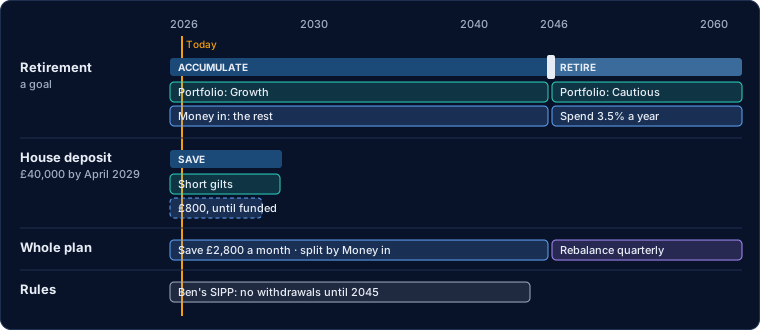
Goals
A goal is what a share of the money is for: a target amount by a date, an income from a date, or no target at all. Goals share your accounts: each owns a share of each account's value, and that share moves with the account's return.
Adding a goal asks which accounts it may use and how much of what is already in them is for it. That share is taken from the account's other goals; nothing is traded. A goal due by a date cannot use an account that cannot be drawn from by then (a SIPP before the pension age), and says so. Money in and goal shares explains how new money and withdrawals reach each goal.
A goal to buy a first home can tick "To buy a first home": it may then use a Lifetime ISA before its owner is 60. A LISA can pay for a first home without the 25% charge once it has been open 12 months, for a property up to £450,000; for anything else it is locked until 60, so any other goal due earlier cannot use it. The app does not check how long the LISA has been open. The House deposit template and the guided set-up's House deposit start with the tick on.
Income goals
An income target is an income in today's money (it rises with inflation) from a date, for a number of years, such as £50,000 a year from January 2044 for 30 years. It is what the plan spends for that goal: it takes the place of the goal's spending element, and the timeline draws it as the goal's spending, edited on the goal. The projection draws that income on every path and gives the chance it is paid in full for all those years. With no number of years, the income runs to the end of the plan.
A goal can instead spend a percentage of its pot each year. That has no target to reach, so it shows no chance: the goal page shows the income the first year of spending pays, in today's money, on the median path and on a poor one (1 path in 10).
Phases
A phase is a stretch of a goal's life with one way of running: Accumulate (save and buy), Maintain (hold the mix) or Draw down (pay an income). Each element can follow a phase, so moving a phase boundary moves everything resting on it.
The phase in force sets how the plan runs that goal's money: choose its type from the phase's menu on the timeline. When two goals are in different phases at once the plan runs in drawdown for the household and says so on the Problems page. A phase can end on a date, at an age, or when a condition is met, such as the goal being funded.
Elements
An element is one thing the plan does: hold a portfolio, take a share of the saving, spend, keep a cash buffer, rebalance, reinvest, move money between accounts, or a rule such as minimum cash. Each runs during a phase or on its own dates.
Elements sit in rows by kind on each lane: Portfolio, Money in, Money out and Policies for a goal; saving, policies and transfers for the whole plan; rules on their own lane. Click a bar to open its settings on the right. The Rules lane also shows the rules the plan adds by itself: an account cannot be drawn from before its owner reaches the access age (add dates of birth on Settings › People), and each person's yearly allowances.
Each rule is one bar, with the accounts it applies to as pills on it. Open a rule and tick the accounts it applies to; deleting it removes it from every account it is on.
The Accounts in the plan list above the timeline shows each account, its value and the rules on it. Add an account from your others (an account can be in one plan at a time), or remove one: its rules and anything that names it, such as a transfer, go with it. The account itself is not changed, and its allowance applies again if you add it back.
Glide path
A glide path moves a goal from one portfolio to another over its window, a step at a time: all of the first at its start, all of the second at its end. Yearly steps over ten years move a tenth of the way each year.
While it runs, the glide path is the goal's portfolio, so it must not overlap another portfolio on the same goal (the Problems page says when it does): end the portfolio before it on its start date and start the one after it on its end date. Each step changes the household's target, and the next rebalancing check trades towards it. The projection and backtests follow the same steps.
Guardrails spending
Guardrails spending starts the income at a rate of the portfolio, say 4%, then holds it in pounds. Each tax year it is cut by a step (10%) if it has grown to more than the upper rate of the portfolio, raised by a step if it has shrunk below the lower rate, and never goes below a floor you set.
The upper and lower rates default to the starting rate × 1.2 and × 0.8 (4.8% and 3.2% for a 4% start). Between them the income does not move, so a small fall changes nothing; a large one cuts the income once, at the next review. The review is at the first income date of each tax year. The income is not raised with inflation except by the lower guardrail.
Pension contributions
A pension contribution pays into one pension on a schedule, in any phase. Under relief at source you set what you pay and the provider adds basic-rate relief (£80 becomes £100); under net pay or salary sacrifice the amount lands as it is. An employer's share is added to either.
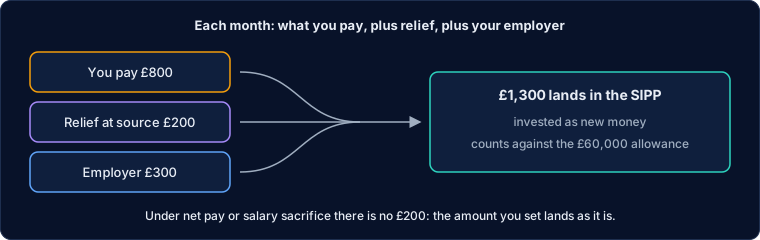
What lands is invested as new money and counts against the £60,000 annual allowance; anything over it is not paid in, and the trades say so. Relief at source reaches the pension some weeks after your payment: the daily check invests what has arrived. The money arriving in that pension counts towards this goal, outside its Money in. Higher-rate relief is claimed through your tax return and does not reach the pension, so it is not included. The plan does not check the contribution against your earnings or a tapered allowance.
Other income
Other income is money paid to you from outside the accounts: a state or defined benefit pension, an annuity, rent. It starts on its date, often an age, and lowers what a fixed £ spending element has to take from the accounts.
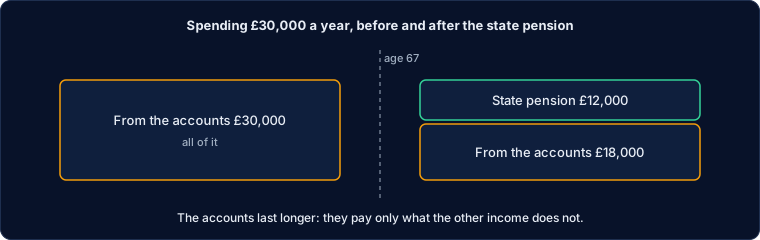
With spending as a % of the portfolio or guardrails it is extra income on top, and the accounts pay the same. Mark it as rising with inflation and the projection grows it each year, from an amount in today's money; the daily check and backtests use the amount as you entered it, so update it when the pension rises. The projection's cash flow view shows it in green, above the line. Income tax on it is not worked out.
Fund replacement
A fund replacement swaps one fund for another (VUSA for VUAG, say) across the plan. ISAs and pensions switch at once: the old fund is sold and the new one bought with the money. GIAs sell the old fund a tax year at a time, keeping the gain within the owner's CGT allowance.
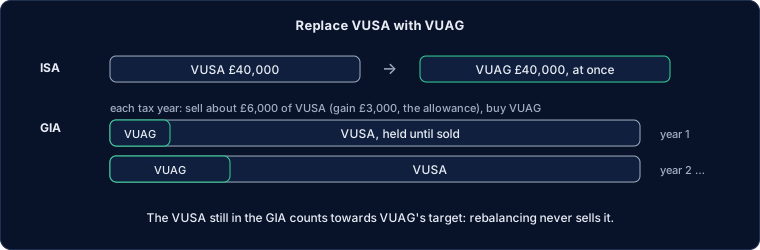
While it is in force the portfolios hold the new fund wherever they say the old one. Until a GIA's old fund is sold it counts towards the new fund's target, so rebalancing never sells it. A GIA can instead sell a fixed £ each tax year, or everything at once. A fund below cost is sold at once, as there is no gain to spread. The GIA sale runs at the first check of each tax year, after any Bed & ISA or swap. Gains are estimates from average cost.
Ladder roll
A gilt ladder in a portfolio is held to maturity unless you roll it. Rolled, the ladder keeps the number of gilts you choose: when one matures, the plan buys a gilt maturing about a year after the last, so the ladder always covers about that many years.
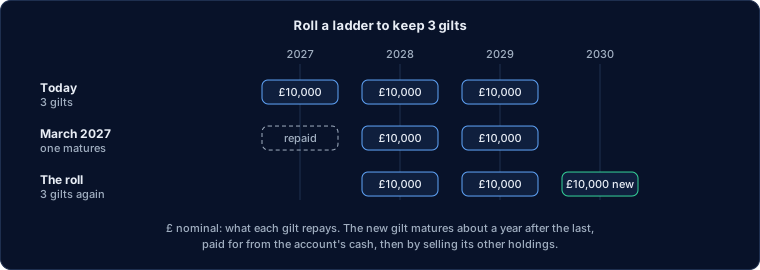
Set it on the portfolio element, which shows the choice when its portfolio holds a gilt ladder. The new gilt is conventional or index-linked to keep the ladder's mix, and repays one of:
- The ladder's average gilt, in £ nominal.
- A set amount, such as £24,000.
- A year's spending: the plan's spending after other income such as a pension. A guardrails or percentage spend uses this year's amount. When the plan spends the dividends there is no amount, so the roll uses the average.
An index-linked gilt repays the amount in today's money: the plan buys the amount divided by its index ratio, and inflation adds the rest. A conventional gilt repays the amount in pounds on the day. In a backtest, old-style linkers (quoted with inflation already in the price) are sized as if their index ratio were 1.
The account that holds the ladder buys it: one with the cash first, then an ISA or pension before a GIA. If its cash is short, it sells its other holdings pro rata. Gilts the roll has bought count as part of the ladder, so rebalancing never sells them; a gilt you hold for itself, maturing more than two years beyond the ladder, does not. Gilts maturing within six months of each other count as one. If no gilt matures within a year of the date it needs, the roll waits.
Gains harvesting
Once a tax year, on a day you choose, the plan sells funds standing at a gain in your GIAs, up to each person's CGT allowance left, and buys a similar fund with the money. The gain is realised tax-free, and later gains are measured from the higher price.
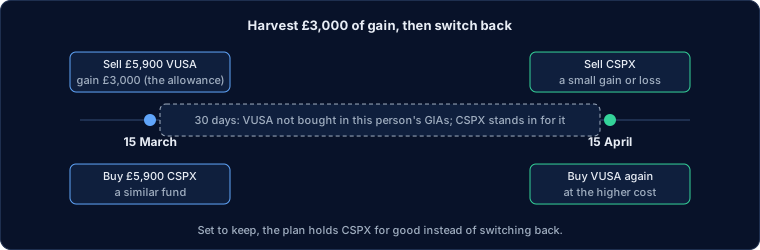
The funds sold first are those with the most gain per £, so the least is sold to use the allowance. The allowance is what is left after the tax year's other sales, so a day near the end of the tax year (15 March by default) wastes none of it.
Buying the same fund back within 30 days would be matched to the sale, which undoes it (the 30-day rule). So for 30 days after a sale, the original fund is not bought in any of that person's GIAs: the similar fund takes its place in the portfolio, and new money goes to it. After the 30 days the plan either switches back, selling the similar fund and buying the original, or keeps the similar fund for good. Purchases in an ISA or pension are not matched.
Similar funds are found automatically and listed closest first. Alfolio compares the weekly returns of every GBP fund of the same asset class over the last three years. "A year apart" is how far the two funds' returns drift apart in a year: under 1% is a close match. The list also shows whether two funds track the same index, or how many of their holdings they share. Another line of the same fund (the same ISIN) is the same security and is never offered. You pick one per fund; the plan never changes your choice.
Gains are estimates from average cost, not figures for a tax return.
Tax loss harvesting
When a fund in a GIA is down at least a set % on what it cost, and the loss is at least a set £ (5% and £500 to start), the plan sells all of it and buys the similar fund you paired it with. The loss is realised while the money stays invested.
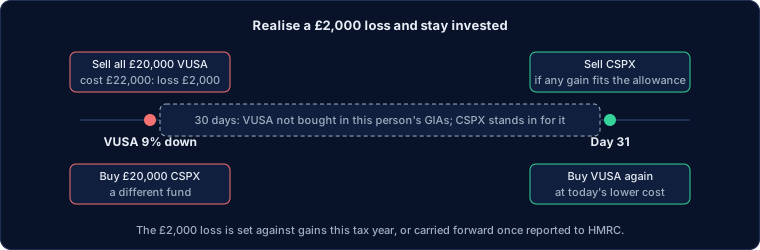
The daily check looks for losses every day, not once a year. As with gains harvesting, the original fund is not bought in that person's GIAs for 30 days, and the similar fund stands in for it. After the 30 days the plan either keeps the similar fund or switches back. A switch back sells the similar fund, so it waits while that sale would realise a gain beyond the person's CGT allowance left.
What HMRC allows. The 30-day rule matches a sale only to a purchase of the same class of shares in the same fund, by the same person, within 30 days after it. A different fund is never matched, even one tracking the same index, and neither is a purchase in an ISA, a pension or by a spouse. Separately, HMRC's anti-avoidance rule for losses (CG-APP9) does not apply to "a simple sale at arm's length of an investment standing at a loss", nor to a buy-back after more than 30 days. It does catch arranging for a spouse to buy the shares and hand them back. HMRC's guidance gives no example of switching to a similar fund.
The similar fund list marks a fund that may be the same fund in another share class (VUSA and VUAG: distributing and accumulating). HMRC treats share classes as separate, but they hold the same portfolio, so this is the pairing most open to the anti-avoidance rule. "Pair each with its closest" skips these for loss harvesting. Pick a different fund instead.
Using the loss. A loss is set against the same tax year's gains first, before the CGT allowance, so a loss in a year with small gains can waste some of the allowance. Losses not used carry forward to later years, but only if you report them to HMRC within four years of the end of the tax year.
Losses are estimates from average cost, not figures for a tax return.
Changing the timeline
Drag a phase boundary, or the edge of a selected bar, by the month. Arrow keys move a focused handle a month at a time (Shift: a year). Everything is saved as you go.
Dragging an element's edge gives that edge its own date; the other edge keeps following its phase, and the tip says "no longer tied to the phase". Dragging a phase boundary moves every element resting on it, and the tip counts them. If someone changes the plan in another window, the page reloads it rather than overwrite their change.
Today
The trades due today, grouped by element or by account, in the order to place them: sells first, so their cash is there for the buys. Once they are placed, Mark all done records it on the plan.
Marking done is how the plan knows the month's saving, the income, a transfer, a one-off spend, a pension contribution or the year's tax move has been made, so it is not due again the next day. "Mark placed" only ticks a trade off in your browser as you go.
The daily check runs at 08:00, after the morning broker sync. It works out each live plan's trades by the calendar (rebalancing on its check dates), shows them on the bell and, with Email me the trades on, emails them with a link that marks them done. A strategy whose accounts are all in a plan that emails stops emailing; its page says so.
Live and draft plans
A live plan is the one that acts on your money: the daily check covers it, it emails its trades and you mark them done. A draft is for trying a variation: you can project it, backtest it and compare it, but it is never checked or emailed.
An account can be in any number of drafts, but in only one live plan, so two live plans never suggest trades for the same money. You can have several live plans as long as they use different accounts.
- Save as… copies the plan into a new draft: its goals, elements, accounts, scenarios and the goals' history, so the goals start with the same values.
- Make live on a draft turns any live plan that shares its accounts into a draft. Nothing is deleted, and you can switch back. The dates the old plan last saved, drew income and paid a lump sum carry over, so nothing falls due twice.
- Make draft stops the daily check and the emails for a plan.
- A new plan, or a strategy opened as a plan, starts live unless a live plan already uses some of its accounts; then it starts as a draft.
Compare
Compare puts this plan beside up to two others: each plan's median projected value on one chart, and each goal's chance of being funded (or of the money lasting) side by side. Estimates from assumed returns, not forecasts.
By default every plan runs on this plan's default scenario (the same returns, inflation and fees), so the difference you see comes from the plans, not the assumptions. Choose Each plan's own to use each plan's own default scenario instead. Elements a scenario leaves out stay with their own plan.
Problems
Everything the plan cannot do as it stands, each with where it is and a link that fixes it: blocking problems first (no portfolio in force, a rule naming an account not in the plan), then things to check (a goal the projection says may fall short, a missing date of birth), then information.
Last updated 2026-11-05.