Strategies
A strategy is a target mix of funds applied across a group of your accounts, with rules for money coming in, money going out, how much cash to keep and when to put the mix back to its targets. Alfolio works out what to buy and sell. You place the trades yourself at your broker.
New to the idea? A portfolio needs a strategy explains why a mix of funds needs a purpose, and Strategy examples sets up five common goals.
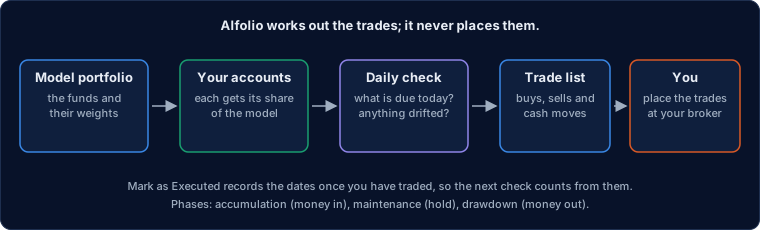
What a strategy is
A strategy is a target mix of funds, applied across a group of your accounts, with rules for money in, money out, cash to keep and when to rebalance. Alfolio proposes the trades; you place them at your broker.
The numbers below are where each part is on the strategy page:
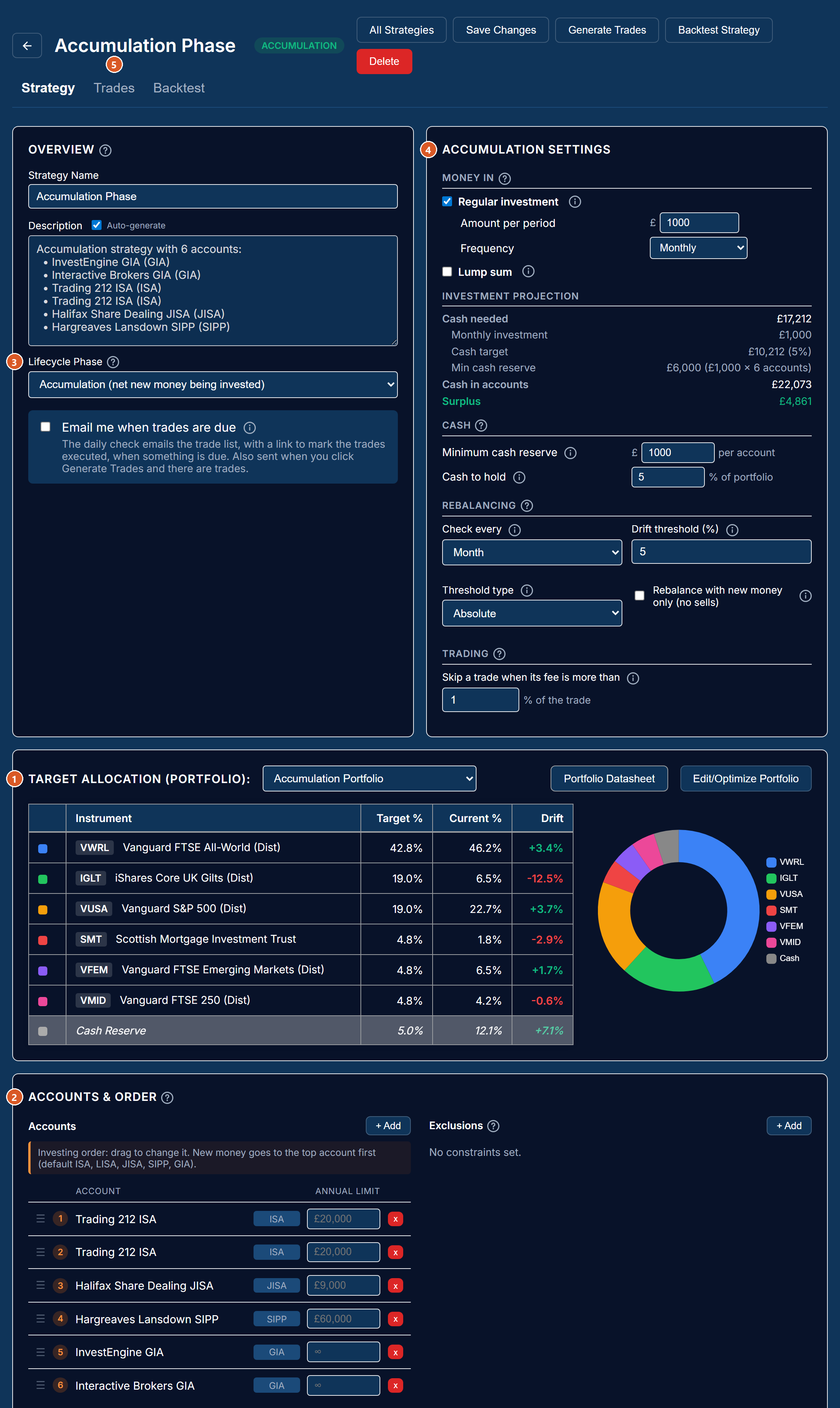
- A model portfolio. The funds and their target weights, chosen on the portfolio editor, with what you hold now beside each target. See What is a portfolio.
- Accounts. The ISAs, pensions and dealing accounts it manages. Each account gets its own share of the model, worked out from the account values and any exclusions, so the accounts together match the model.
- A phase. Whether you are putting money in, holding, or taking money out (below).
- Settings, in the same sections for every phase. Each has its own page: Money in · Money out · Cash · Rebalancing and trading · Accounts, orders and allowances.
- The trade list. Every morning the strategy is checked and, when something is due, you get the trade list; the Trades tab shows it at any time. See The daily check and the trade list.
A backtest, on the third tab, replays the strategy over past years.
The three phases
Accumulation is for putting money in, maintenance for holding a mix without adding or taking, and drawdown for taking a regular income out. The phase chooses which sections of the page apply; the settings themselves mean the same thing in every phase.
- Accumulation. New money arrives on a schedule and is invested. The "Money in" section applies. By default a check only buys, so your contributions go to whatever is below target rather than selling winners (see New money only).
- Maintenance. No money in or out. The strategy only rebalances when a holding has drifted past the threshold on a check date.
- Drawdown. A regular income is taken out. The "Money out" section applies, and the cash to hold becomes an income buffer.
Changing the phase keeps the accounts, the model and every shared setting, and the dates of the last investment and the last income drawn.
What is not done
Alfolio proposes trades and records what you tell it; it never places an order, and it does not work out the tax a trade would create.
- No trades are placed. Everything on the Trades tab is for you to enter at your broker. Prices are from the last sync.
- No capital gains calculation on proposed trades. Selling in a dealing account can create a gain. Alfolio's capital gains report covers trades you have made, not ones proposed here; "sell losers first" is an ordering rule, not a tax calculation.
- Allowances are counted, not enforced by your broker. The figures come from the transactions Alfolio has seen; money paid in elsewhere is not known.
- The scheduled check keeps the calendar; Generate Trades does not. A click checks drift today, so the two can differ on a day between check dates.
Last updated 2026-10-13.