Rebalancing
You choose a mix, say 60% shares and 40% gilts. From the next day the prices move, and so does the mix. Rebalancing means selling some of what has grown and buying what has lagged, to get back to the weights you chose.
How a mix drifts
Whatever does best takes up more and more of the portfolio:
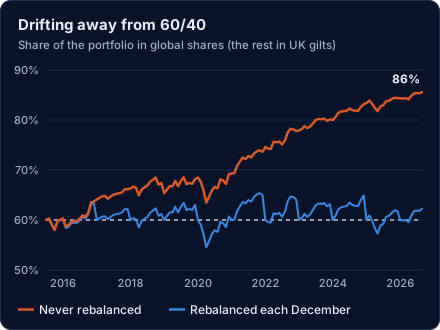
Left alone, a 60/40 mix of global shares and UK gilts started in June 2015 was 86% shares by August 2026: a much riskier portfolio than the one chosen, without anyone deciding so.
What rebalancing does, and does not do
Rebalancing keeps the risk you chose. It does not promise a higher return.
Over those same years the mix that was never rebalanced returned 9.5% a year, against 7.8% for the one rebalanced each December, because shares kept beating gilts and it held more and more of them. It also had more volatility, 9.1% against 8.3%, and by the end it was a different portfolio. In years when the leader changes, rebalancing can come out ahead instead.
In real life each rebalance means trades, which can cost dealing charges and, outside an ISA or pension, create a capital gain. The optimizer leaves those out (see What is not modelled).
Ways to rebalance
There are three common approaches.
- On a calendar. Put the mix back to its weights on fixed dates, such as every month, quarter or year, however far it has drifted. Simple and predictable, but it trades even when the mix has barely moved, and can leave a big drift alone until the next date.
- When it drifts too far (threshold rebalancing). Set a limit, a drift band, and rebalance only when a holding moves outside it. It trades less often, and only when it matters. Bands are defined in different ways:
- absolute: a fixed number of percentage points either side of the target, the same for every holding;
- relative: a share of each holding's own target, so small holdings get narrow bands;
- some investors instead watch the whole portfolio, for example the total amount out of place across all holdings, or set bands on asset classes (shares, bonds) rather than single funds.
- Both together. Check on a calendar, but act only if the mix has drifted past the band. This is what the optimizer does when you switch drift bands on.
A fourth approach costs nothing extra: when you pay money in or take it out, direct it to whatever is under or over weight. That rebalances gradually without selling anything. The optimizer does not model new money or withdrawals.
How often to rebalance
The optimizer can test these schedules:
| Setting | When the mix is put back to its weights |
|---|---|
| Daily | Every trading day |
| Monthly | The last trading day of each month (the starting choice) |
| Quarterly | The last trading day of March, June, September and December |
| Annually | The last trading day of each year |
| Never | Never: bought once and left alone |
Tick more than one and the optimizer treats the schedule as another thing to choose: it tries each weight mix with each ticked schedule and reports which combination did best.
Every schedule is worked out day by day and measured the same way (see How the figures are measured), so the figures for different schedules can be compared directly.
Drift bands
A drift band rebalances only when the mix has moved far enough from its weights to be worth it, instead of on every scheduled date (see Ways to rebalance). With a band switched on, the optimizer checks the mix on each scheduled date, and rebalances only if at least one holding has drifted outside its band. With Never, the check happens every day.
The optimizer offers two ways to set the width:
- Absolute: a number of percentage points either side. A 25% holding with a 5-point band is rebalanced when it goes below 20% or above 30%.
- Relative: a share of the holding's own weight. A 25% holding with a 20% relative band is rebalanced below 20% or above 30% (20% of 25% is 5 points). A 5% holding with the same band is rebalanced below 4% or above 6%, so small holdings get narrow bands.
In the optimizer, tick Drift Bands and set a Min, Max and Step: it tries every band from Min to Max in Step increments, for each type you tick, alongside every schedule. With Step at 0 it uses the Baseline band only.
Last updated 2026-10-07.