Accounts, orders and allowances
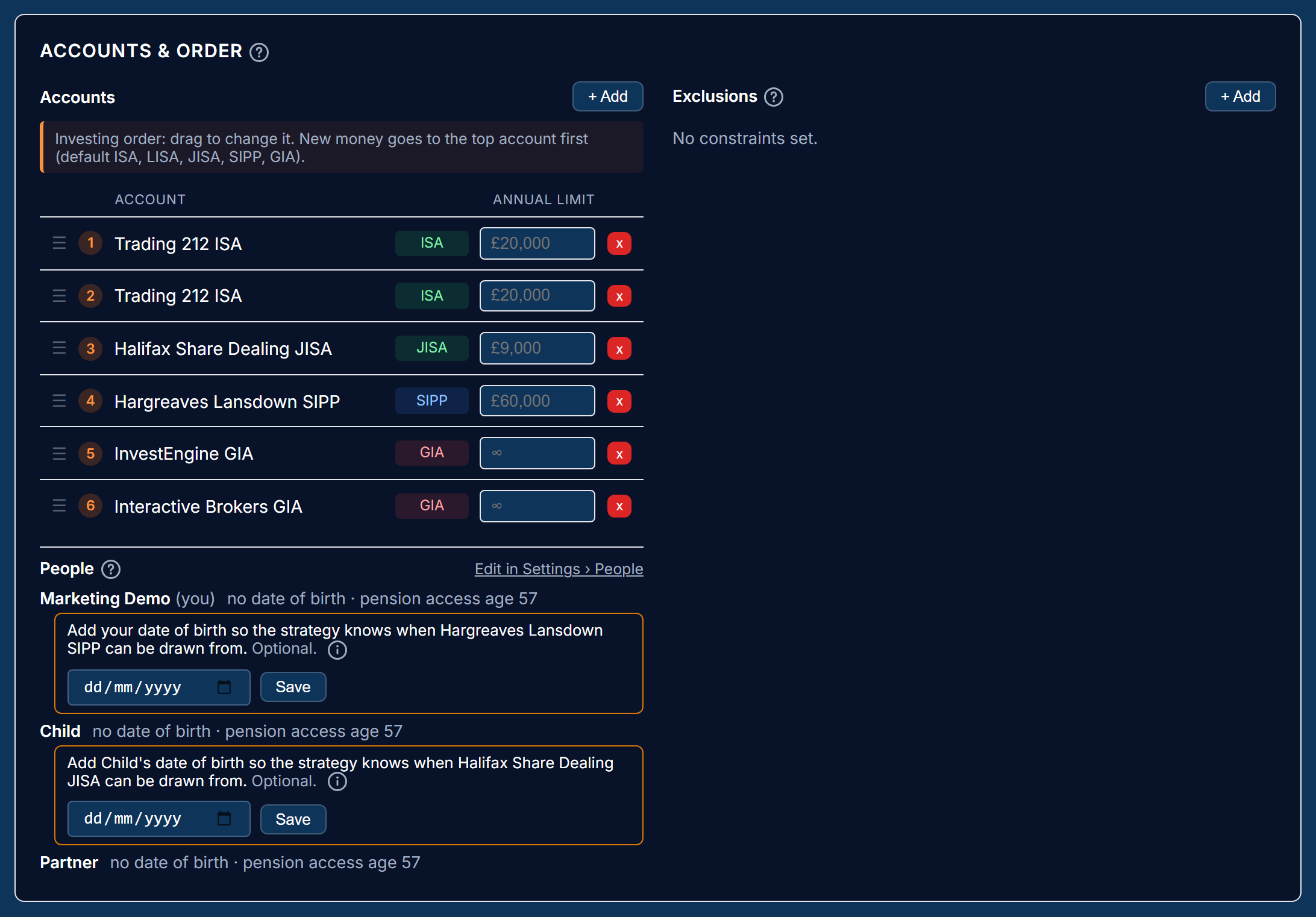
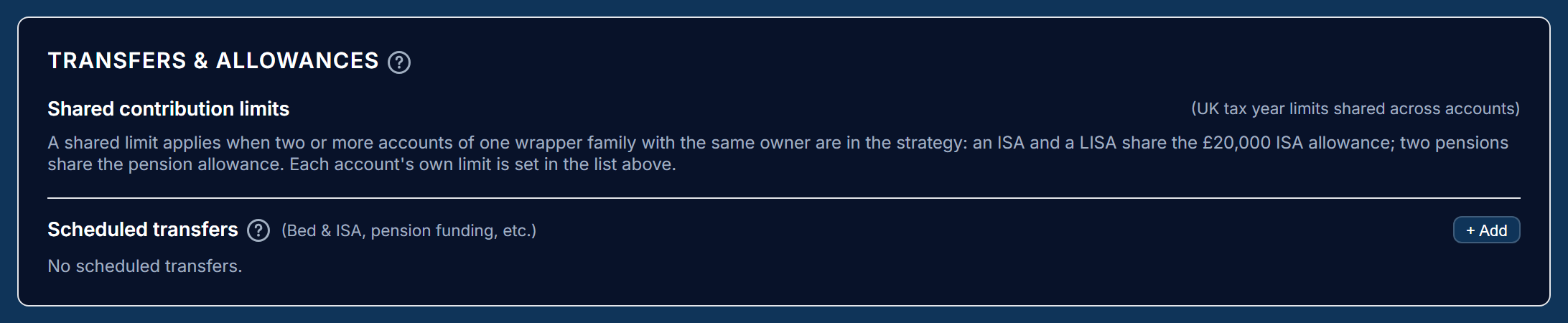
The Accounts & order panel lists the accounts the strategy manages, in the order money goes to them or comes from them, with each account's selling method and exclusions. The Transfers & allowances panel shows the yearly limits and any scheduled transfers between accounts.
Investing and withdrawal order
Money in goes to the accounts in investing order; money out comes from them in withdrawal order. The defaults are ISA, LISA, JISA, SIPP, then GIA for investing and GIA, ISA, LISA, JISA, SIPP for withdrawing. Drag the list to change either.
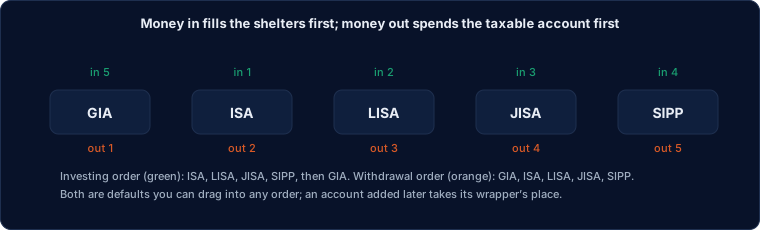
The defaults fill tax-sheltered accounts first and spend the taxable account first, which is the usual advice: contributions inside an ISA or pension grow free of tax, and money taken from a dealing account first leaves the shelters growing for longer. Your circumstances may differ (a pension you cannot access yet, a child's account), so the order is yours to set. An account added later takes its wrapper's place in both orders.
Within an income, the first account in the withdrawal order pays what it can from cash, then its holdings are sold, then the next account, as described in where the income comes from.
Where the income comes from
The income walks down the withdrawal order once: the first account's spare cash above its reserve, then that account's holdings, then the next account's cash, and so on, until the income and the cash buffer are covered.
An account later in the order gives up nothing while an earlier one still has spare cash or something it can sell. Holdings that are excluded, held to maturity or not in the model do not count as sellable, so an account holding only bond rungs passes the walk on to the next. The cash buffer stays where the walk raised it; Alfolio does not move cash between accounts, which may belong to different people.
Put your GIAs first so tax-free accounts are used last: the strategy page warns when an ISA, Lifetime ISA or pension comes before a GIA that still has holdings to sell. An account excluded from withdrawals is never used, and a pension or Lifetime ISA joins the walk on the date it can be drawn from. The Trades tab lists each account the walk used, with its cash and its sales.
Spread capital gains across account holders
When income has to be sold from the GIAs of more than one person, this setting (off by default) fills each person's tax-free capital gains allowance first, then shares the rest so each person's extra gain is about the same.
The setting sits under the withdrawal order in Accounts & order. It appears in the drawdown phase when the strategy has GIAs belonging to more than one person, since that is the only case it changes.
Without it, the GIAs are sold in the withdrawal order, so the first person's account takes the whole sale and all of the gain. With it:
- Each person's allowance left this tax year is the annual exempt amount less the gains they have already realised (a loss adds room), worked out as in the capital gains report from every taxable account they have.
- Within one person, the holdings with the smallest gain per £1 are sold first. The gain per £1 comes from the average cost the holding carries, as in HMRC's pooling rule. A gilt counts as no gain, since gilts are exempt.
- Only the GIAs' share of the sale is divided. The withdrawal order is kept: ISAs and pensions are still drawn after the GIAs.
The Trades tab shows, for each person, what they sell, the estimated gain and the allowance left after it. These are estimates: same-day and 30-day matching and each person's tax rate are not taken into account. Rebalancing sales are not spread yet. A backtest keeps its own record of each person's gains, year by year.
Exclusions
An account can be excluded from withdrawals, from new investment, from holding cash, or from holding a particular fund. The rest of the strategy adjusts around it.
- Excluded from withdrawals. No income is taken from it and it holds no buffer. Its dividends count towards the income only when replicating the full yield.
- Excluded from investment. New money passes it by.
- No cash. It has no cash target; all of it is invested.
- Cannot hold a fund. Its share of the model skips that fund, and the other accounts hold more of it so the strategy as a whole still matches the model.
When an account can be drawn from
A SIPP can be drawn from at its owner's pension access age (57 by default), a Lifetime ISA at 60 without the 25% charge, and a Junior ISA at 18, when it becomes the child's. Give each owner's date of birth in the People list and the strategy leaves those accounts out of withdrawals until their date, with a warning.
The access date is worked out from the date of birth and the wrapper. The pension access age can be set per person, for a scheme with a different age. Without a date of birth a SIPP, Lifetime ISA or Junior ISA is treated as locked: selling in a pension before its access age is an unauthorised payment, so the strategy leaves the account alone and warns that the date is missing. An account that cannot be drawn from yet holds no cash buffer either; its dividends count towards the income only when replicating the full yield.
Set-up warnings
The Trades tab and the connector warn about settings that would not do what you probably want: a percentage income based on money that cannot be drawn yet, an owner with no date of birth (the account is treated as locked until it is added), bonds in a locked account that mature before the account can be drawn from, a collection in the model none of whose members is held, and bonds maturing within three years in an account late in the withdrawal order.
The warnings do not stop the trade list; they say what to change. They are recorded by the daily check and returned to a connected assistant with the strategy.
Contribution limits
Each account has a yearly contribution allowance (the UK defaults: ISA £20,000, LISA £4,000, JISA £9,000, pension £60,000; a dealing account has none). Money in and incoming transfers stop at the allowance; what has been paid in since 6 April is counted from the account's transactions.
The Lifetime ISA's 25% government bonus arrives in the account as a deposit, but it is not your money paid in, so it is left out of the count.
Accounts of one family with the same owner share a limit: an ISA and a LISA share the £20,000 ISA allowance, two pensions share the pension allowance. These shared limits appear in Transfers & allowances when they apply. Each account's own limit is set in the Accounts & order list.
A trade list that would breach a limit is trimmed, with a warning that says how much of the allowance is used. Override limits proposes the untrimmed list once, for when the allowance figures Alfolio has are wrong.
Scheduled transfers
A regular move of money from one account to another: selling in the source account by its selling method, moving the cash, and buying in the target account, within the target's allowance. The usual use is "Bed & ISA": moving a dealing account into an ISA each tax year.
Each transfer has an amount a year and a frequency (monthly, quarterly
or yearly). A yearly transfer is due once per tax year, from 6 April.
The trade list shows the sells, a "Move £X to
Last updated 2026-10-19.